Quick Summary
The U.S. Department of Justice announced on September 1, 2026, that an international operation disrupted infrastructure used by Sality botnet, malware associated with a peer-to-peer botnet active since 2003. Authorities seized Sality-linked domains, while government and private-sector partners redirected some botnet communications through a sinkhole.
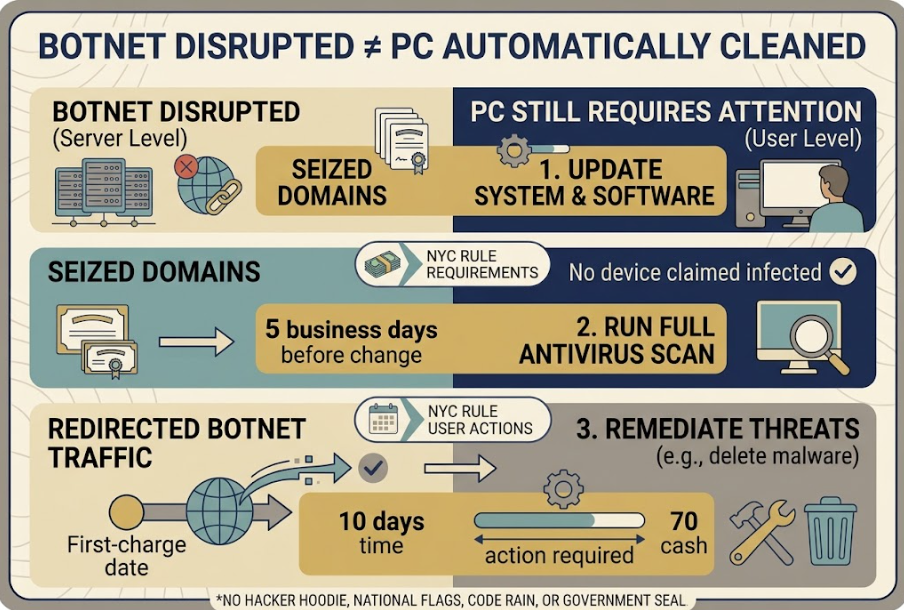
That is meaningful disruption, but it does not mean malware was automatically removed from every infected computer. The DOJ says the Shadowserver Foundation is working with internet service providers and incident-response teams to identify infections and assist with victim notification and remediation.
An old or slow PC is not automatically a Sality bot. Performance problems, pop-ups, browser redirects, unusual data use, and security alerts can have many causes. The practical response is to check whether the operating system is still supported, update security tools, run progressively deeper scans, and protect important accounts from a known-clean device if infection is detected or strongly suspected.
Reader Decision
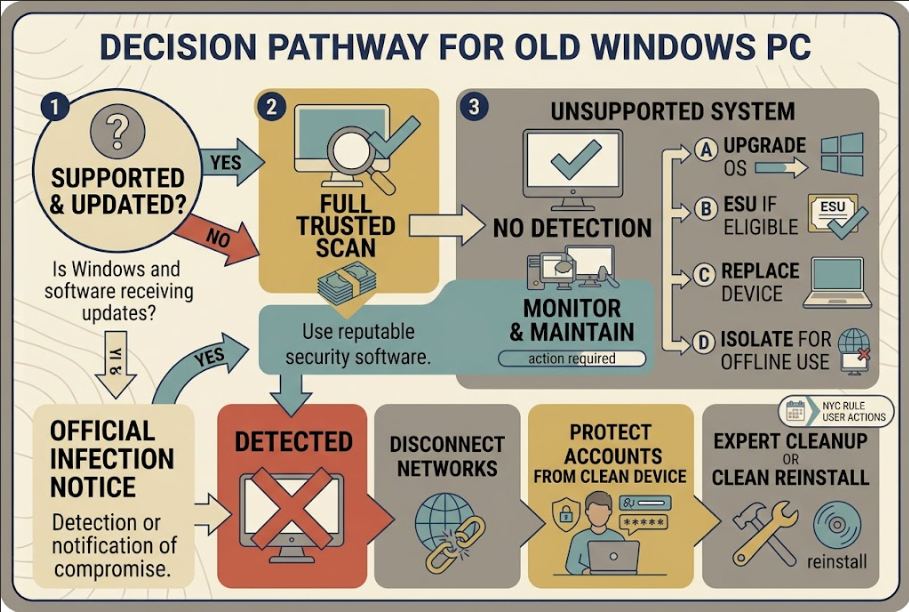
Do not discard or factory-reset an old PC merely because the Sality operation made the news. First determine whether the operating system still receives security updates, run a full or offline malware scan, and review the result. If malware is found—or an ISP or incident-response team sends a notice—disconnect the PC from networks, protect important accounts from another trusted device, and decide whether verified cleanup or a clean reinstall is the safer recovery path.
What the International Operation Actually Did
Sality is malware that can turn a compromised computer into a “bot”—a device used without its owner’s knowledge as part of a larger malicious network. According to the DOJ, the botnet enabled cryptocurrency theft and cyberattacks against victims in the United States and other countries.
Sality used peer-to-peer communication: infected computers could communicate directly to exchange commands. Removing one server therefore would not necessarily end every connection.
The operation involved the United States, Bulgaria, Hungary, and Romania, plus CrowdStrike and Shadowserver. Authorities acted against linked domains and conducted a sinkhole operation, redirecting malicious traffic toward defender-controlled infrastructure to disrupt commands and identify systems still connecting.
The DOJ called the action a disruption, not a declaration that every infection had been erased. It also did not publish a consumer list of infected computers or a webpage where someone can type a device serial number to receive a diagnosis.
Why Your Computer Was Not Automatically Cleaned
Taking away infrastructure and removing malware from an endpoint are different jobs. The first limits how a botnet communicates or operates. The second requires action on the individual computer: detection, quarantine or removal, verification, and sometimes rebuilding the system.
A device may retain malicious files even when their external communications are redirected or unavailable. It may also contain unrelated malware, exposed credentials, or unsupported software. Conversely, a computer that is merely old, noisy, or slow may have no Sality infection at all.
The operation creates a reason to check neglected systems—not reassurance that a machine was remotely cleaned or a diagnosis based on age.
Start With the Operating System
Open the Windows version information and check whether that edition still receives security updates. A current antivirus scan cannot turn an unsupported operating system into a supported one.
Microsoft ended standard Windows 10 support on October 14, 2025. Windows 10 computers continue to work, but they generally no longer receive ordinary security fixes. Microsoft directs eligible users to Windows 11, an eligible Windows 10 Extended Security Updates program, or a supported replacement device. Some specialized editions follow different lifecycles, so verify the exact edition rather than relying only on the familiar Windows name.
If the PC runs Windows 7, 8.1, an unsupported Windows 10 installation, or another retired system, do not use it for banking, payroll, email administration, cryptocurrency, or storing irreplaceable credentials while deciding what to do. A machine kept for one legacy program can be isolated from routine internet use instead of treated as a normal household computer.
Run a Layered Malware Check
Before scanning, save open work and install legitimate operating-system and security updates that remain available. Confirm that real-time protection is enabled and security definitions are current. Do not download a “Sality cleaner” from an advertisement, pop-up, or unsolicited message.
Microsoft recommends a quick scan for routine checks and provides deeper options under Windows Security → Virus & threat protection → Scan options. A full scan examines more files. Microsoft Defender Offline restarts the computer and scans from the Windows Recovery Environment, which can help find threats that hide while Windows is running.
For an older PC returning to service:
- Verify the Windows edition and support status.
- Apply available Windows and security updates.
- Run a full scan with the installed trusted security product.
- Review the protection history and exact detection name.
- Use an offline scan if malware persists, returns, or the security tool recommends it.
Record the detection name, affected file, action, date, and result. Neither a removed threat nor a scan without detections proves the machine was never compromised.
What to Do If Malware Is Found
Disconnect the affected PC from Wi-Fi, Ethernet, Bluetooth, shared drives, and removable storage that is not needed for recovery. This limits further communication and reduces the chance of affecting other devices. For a work computer, stop and contact the employer or IT administrator; self-directed cleanup may destroy evidence or conflict with incident procedures.
From a different, updated device that you reasonably believe is clean, change passwords for email first, then financial, work, cloud-storage, shopping, and cryptocurrency accounts used on the affected PC. Use unique passwords and enable multifactor authentication. Review account sessions, forwarding rules, recovery addresses, recent transactions, and security alerts.
Do not change important passwords on the suspected computer before it is trusted again. If malware can capture keystrokes or browser data, entering new credentials there may expose the replacements.
Follow the security product’s remediation instructions and rescan. If detections return, system files are damaged, tools will not run, or the PC handled valuable access, seek qualified help. A clean reinstall from trusted media may provide more confidence, although it cannot undo data already stolen.
Back Up Carefully Before Reinstalling
Back up irreplaceable personal data such as documents and photos, but avoid copying unknown programs, installers, scripts, cracked software, or entire unverified system images into the new environment. Scan backup media before opening restored files.
Write down legitimate software licenses and account recovery information independently. If full-disk encryption is enabled, confirm that the recovery key is available before changing partitions or reinstalling Windows.
A factory reset is not the first response to a news headline, but it can become a reasonable recovery option after a confirmed or persistent infection. The decision depends on the detection, value of the accounts involved, ability to verify cleanup, and whether the operating system can return to a supported state.
What If You Receive an Infection Notice?
The DOJ says Shadowserver is working through internet service providers and Computer Security Incident Response Teams to identify infections and help with notification and remediation. A legitimate notice may therefore come through an ISP or another recognized incident-response channel.
Treat any message as a lead to verify, not permission for remote access. Contact the ISP through the number on your bill or its official site. Do not pay cryptocurrency, install an unexpected tool, or give a caller control.
The Practical Takeaway
The Sality operation weakened malicious infrastructure and may help defenders identify infected systems. It did not perform a universal remote cleanup.
For households and small businesses, the durable lesson is broader than one malware family: an old computer should not become invisible simply because it still turns on. Confirm its support status, scan it with trusted tools, limit what it can access, and maintain a recovery path. If a credible notice or detection appears, isolate first and protect accounts from a clean device before deciding between remediation and a clean rebuild.
This newsletter provides general cybersecurity information, not a diagnosis of any device or individualized incident-response advice. Malware behavior and recovery requirements vary. Organizations and people facing financial loss, sensitive-data exposure, or persistent compromise should consult qualified IT or cybersecurity professionals.
FAQ
Did law enforcement shut down Sality completely?
The DOJ describes a coordinated disruption involving a sinkhole and domain seizures. It does not say every infected device or every component of the peer-to-peer network was permanently eliminated.
Was malware automatically removed from infected PCs?
No such universal cleanup was announced. Individual devices still require detection and remediation.
Does a slow old PC mean it has Sality?
No. Slowness, pop-ups, redirects, battery drain, and unusual data use can justify a scan but do not identify one specific malware family.
Should I change passwords before scanning?
If compromise is suspected, change important passwords from a separate trusted device—not from the questionable PC—and enable multifactor authentication.
Is a factory reset always necessary?
No. The appropriate response depends on the detection and whether cleanup can be verified. Persistent infection or high-value exposure may justify a clean reinstall or professional help.
Can I keep using Windows 10 safely?
Standard support ended October 14, 2025. Microsoft recommends moving to Windows 11, using the Consumer ESU program on an eligible PC, or replacing the device. Specialized editions may have different lifecycles.
Sources
- U.S. Department of Justice — Sality Malware Disrupted in International Cyber Takedown
- Microsoft Support — How to Start a Scan for Viruses or Malware
- Microsoft Support — Virus and Threat Protection in Windows Security
- Microsoft Support — Windows 10 Support Ended October 14, 2025
- CISA — Protecting Against Malicious Code
- CISA — Recovering from Viruses, Worms, and Trojan Horses