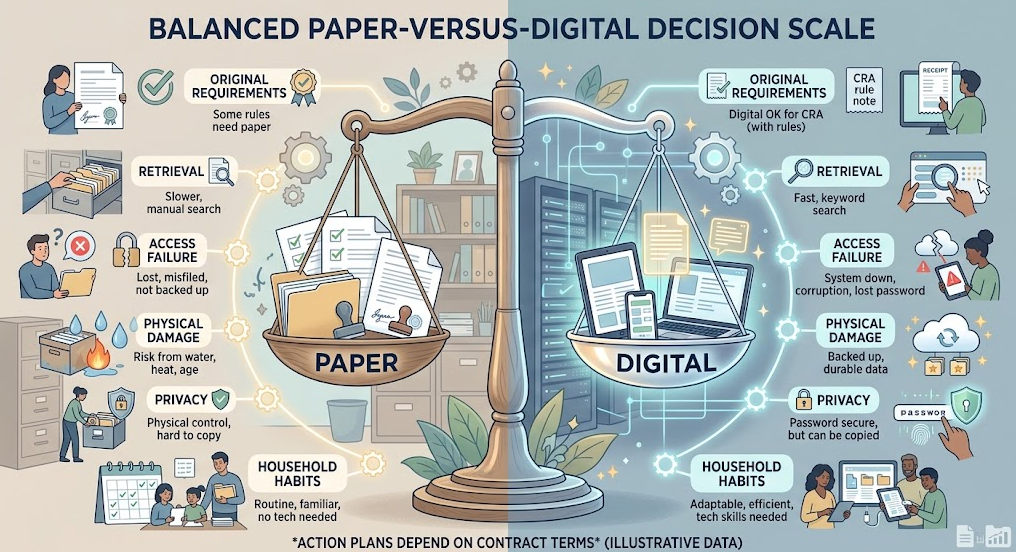
A paper statement can survive a forgotten password but not a house fire. A digital file can survive a leaking pipe but still disappear behind a closed account, failed device, unreadable format, or filename no one recognizes. Neither format is automatically safer, more official, or easier to retrieve.
Jerome receives many utility and account records digitally, yet still chooses mailed bank statements. Paper gives him another prompt to review the account, and he does not want important history to depend on how far back a bank’s online interface happens to display. Another household may solve the same problem with scheduled downloads and digital review reminders.
The useful choice is document-specific. Keep the format that preserves legal usefulness, readable content, reliable access, privacy, and household retrieval for the full period the record must remain available. For some records, that means a hybrid system.
Quick decision: Keep an original when an authority, contract, court, or foreseeable transaction may require it. Use digital records when they are accepted, complete, readable, searchable, and stored under household control. Use both when the consequence of losing access is high or one format solves a weakness in the other. Never treat an online portal as the household’s permanent archive unless its availability and export limits are known.
Ask Six Questions Before Choosing the Format
For each document category, ask:
- Could an original or certified copy be required?
- Will the receiving organization accept an electronic copy?
- Can the household retrieve the complete record without relying on the issuer’s portal?
- Will the file remain readable for the entire retention period?
- Which format creates the more manageable theft, loss, fire, water, or account-access risk?
- Will the people who need the record know how to find and use it?
These questions prevent two common errors: scanning everything and discarding originals without checking, or keeping every paper while assuming physical possession alone guarantees recovery.
Keep Originals When Legal or Practical Value Depends on Them
Some records may need an original, certified copy, seal, notarization, wet signature, or issuing-authority version. Examples can include civil-status certificates, passports, immigration documents, wills, powers of attorney, court records, property instruments, negotiable documents, and certain signed agreements.
Requirements vary by country, transaction, institution, and document. Do not destroy an original merely because a scan looks perfect. Ask the issuing body or the organization likely to receive it:
- Is a scan accepted for routine use?
- Could the original or a certified copy be required later?
- Does digitizing affect validity, negotiability, registration, or evidentiary value?
- Is there a formal electronic original already available?
- How difficult and costly would replacement be?
A digital copy of an original remains useful for reference, recovery information, insurance inventory, and emergency access. It is not automatically a substitute for the authoritative record.
Prefer Digital When It Improves Retrieval Without Reducing Acceptance
Digital records work well for recurring statements, routine bills, receipts, policies, warranties, manuals, transaction confirmations, and records originally delivered electronically—provided the household controls a complete copy.
Digital advantages include:
- full-text search where the file contains searchable text;
- consistent naming and sorting by date;
- fast copying for a claim or application;
- reduced physical storage;
- access by authorized household members in different locations; and
- protection from a single local physical event when copies are appropriately separated.
But a screenshot is often a weak record. It may omit the issuer, full date, account context, terms, page count, or transaction details. Download the complete statement, invoice, policy, receipt, or signed agreement in the format the issuer provides. Save related attachments and terms together.
Canada’s CRA guidance accepts paper records, paper later converted to an accessible and readable electronic format, and records created and retained electronically. That is a Canadian tax example, not permission to discard every original for every legal purpose. The core lesson is that an electronic record must remain accessible, readable, and adequate for its intended use.
Do Not Confuse a Portal With a Saved Record
Bank, utility, insurer, employer, retailer, medical, government, and school portals are delivery and access systems. They are not necessarily permanent household storage.
Access can change when:
- the account closes or changes provider;
- the institution limits older statements;
- a family member leaves an employer or school;
- an app or portal is redesigned;
- a subscription ends;
- credentials or recovery channels are lost;
- an estate or authorized person needs access; or
- a dispute arises after the visible history has rolled off.
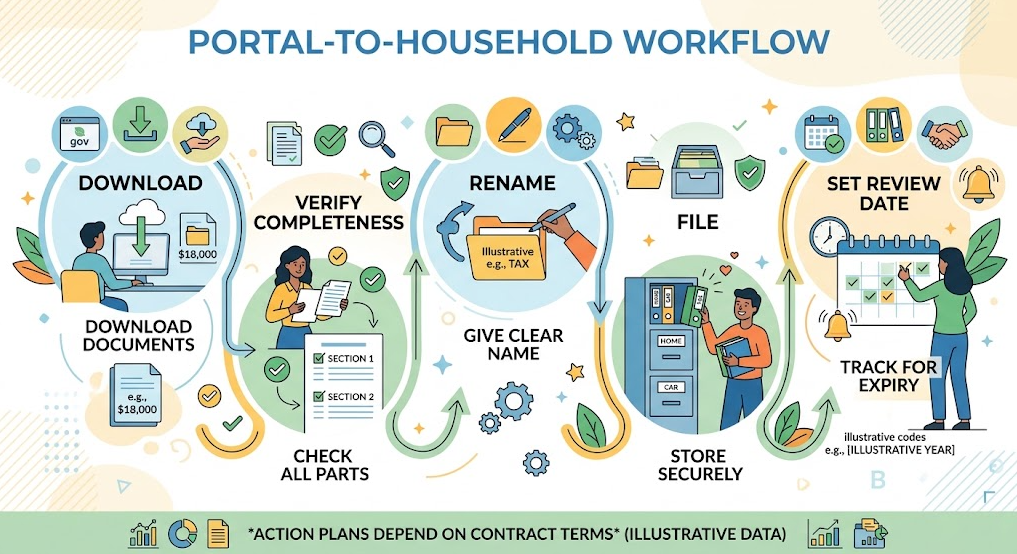
Download records before the likely access change. Prioritize final contracts, annual statements, tax slips, insurance policies, proof of major transactions, significant receipts, claim files, and any document with a retention requirement longer than the portal’s displayed history.
Jerome’s paper bank statements give him both a review prompt and a household-held history. A digital-first household can reproduce those functions by scheduling a monthly account review and automatic or manual statement download. The format can differ; the control should not.
Scan for Evidence, Not Merely for Appearance
A useful scan must preserve the information needed to identify and use the document.
Before filing or discarding paper, check:
- every page, including backs with terms or endorsements;
- issuer, recipient, dates, amounts, signatures, and reference numbers;
- stamps, seals, annotations, attachments, and envelopes when the postmark matters;
- colour where it carries meaning;
- legibility at normal enlargement;
- correct page order and orientation; and
- a filename and folder that another authorized person can understand.
Use a common, durable format that the household can open without specialized proprietary software. PDF is often practical for multi-page records; a high-quality image may suit a receipt or label. Searchable text is convenient, but optical character recognition can make errors. Retain the page image as the evidence and verify critical names, dates, and numbers rather than trusting extracted text.
The US National Institute of Standards and Technology’s electronic file organization guide emphasizes clear, understandable, consistent filenames and notes that vague labels such as “new” and “old” are less effective than controlled versions or a clear final designation.
One workable filename pattern is:
YYYY-MM-DD_Issuer_Subject_Document-Type_Status.pdf
Examples:
2026-08-31_BankA_Chequing_Statement_FINAL.pdf2026-04-12_RoofCo_Home-Roof_Paid-Invoice.pdf2026-01-01_Insurer_Home-Policy_Current-to-2027.pdf
Avoid placing full account numbers or national identifiers in filenames because filenames may appear in search results, recent-file lists, or notifications.
Build the Same Categories in Paper and Digital Systems
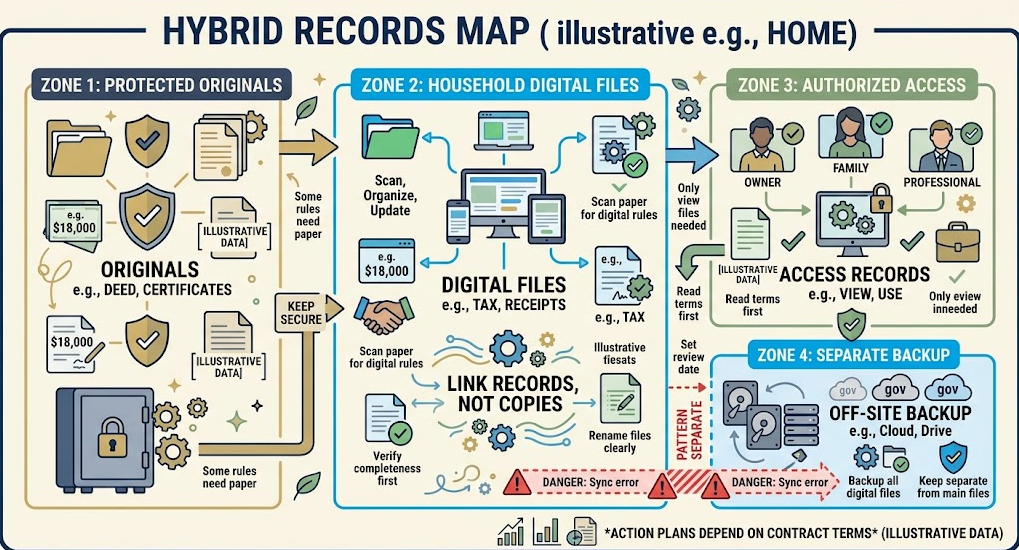
A hybrid system becomes confusing when paper is organized by subject but digital files are scattered by app or download date. Use the same top-level logic in both:
- Identity and Family
- Home and Property
- Vehicles
- Money and Tax
- Insurance and Benefits
- Work, Education, and Care
- Purchases and Warranties
- Legal and Estate
Within each category, distinguish Current, Action, Archive, and review dates as appropriate. A records map should say which format is authoritative and where the companion copy lives.
For example:
| Record | Primary format | Companion | Why |
|---|---|---|---|
| Passport | protected original | secure reference copy | original may be required; copy aids recovery |
| Monthly utility bill | digital | none or temporary paper | routine retrieval and address evidence |
| Signed home agreement | original or authoritative signed electronic version | protected copy | high consequence and long retention |
| Appliance receipt | digital scan | paper until scan verified | fading paper and warranty retrieval |
The hybrid system should be selective. Duplicating every low-value record doubles maintenance without meaningfully reducing risk.
Match Security to the Information
Paper risk comes from casual viewing, theft, misfiling, fire, water, and insecure disposal. Digital risk comes from weak account security, shared devices, malware, accidental deletion, broad cloud sharing, lost recovery access, and unencrypted storage.
For sensitive digital records:
- use a device and account protected by a strong unique password;
- enable multi-factor authentication where available;
- keep systems and applications updated;
- use device encryption and screen locking;
- restrict shared-folder permissions;
- avoid emailing unprotected identity records unnecessarily; and
- remove personal data securely before disposing of a device.
The FTC recommends current software, strong passwords, and two-factor authentication for devices and accounts. Its connected-device guidance also points to encryption and passcode lockout as added layers.
Do not put every household member’s identity, tax, banking, and medical records into one broadly shared folder for convenience. Give access according to role and need. Record how another authorized adult can recover access without writing passwords on the records map.
Choose Paper When It Improves Human Follow-Through
Paper can be useful when a physical prompt makes action more reliable. A current action folder, a document needed at an appointment, or a statement someone consistently reviews on paper may work better than another unread notification.
That benefit disappears if paper becomes an unprocessed stack. If choosing paper for visibility:
- place it in a private, limited action location;
- capture deadlines in a calendar;
- file it after action;
- scan it if a recovery copy is justified; and
- securely destroy it when all retention purposes end.
Digital can also create deliberate prompts through scheduled reviews, task reminders, and automatic file rules. The best system is the one that makes both action and later retrieval reliable—not the one that appears most modern.
Test the Choice With a Retrieval Drill
Pick one record in each high-consequence category and try to retrieve it:
- Can you find the current policy rather than last year’s?
- Can you open the file without the issuer’s portal?
- Is every page readable?
- Can another authorized adult locate it using the records map?
- Do you know whether the original still exists and is required?
- Can you identify the document without exposing sensitive data in the filename?
If the answer fails, change the format or workflow before digitizing the rest of the archive.
Article”How to Back Up Household Records“ will address multiple copies, backup separation, encryption choices, and restoration testing. For now, remember that format conversion is not backup. Scanning a document and deleting the only paper copy merely changes the location of the single point of failure.
A Practical Format Rule
Use three outcomes:
- Paper primary: original or certified form may be required, physical review materially improves action, or digital acceptance is uncertain.
- Digital primary: the record is accepted electronically, complete, readable, household-controlled, and easier to retrieve securely.
- Hybrid: consequence of loss is high, an original must survive while a copy supports access, or each format addresses a distinct risk.
Review the choice when a contract changes, an account closes, a household member’s role changes, a document nears expiry, or the technology used to read the file is being replaced.
The objective is not a paperless home. It is a household record system that still works when the portal is unavailable, the paper is damaged, or someone other than its creator needs the evidence.
FAQ
Is a scanned document legally as valid as the original?
Not always. Acceptance depends on the document, jurisdiction, issuing authority, recipient, and transaction. Keep the original or certified copy whenever it may be required, even if a scan is useful for reference and recovery.
Can I discard paper tax receipts after scanning them?
Confirm the current rules of the relevant tax authority and ensure the scan is complete, readable, and retained for the required period. Tax acceptance does not determine whether the original is needed for a warranty, legal, insurance, or other purpose.
Is an online bank statement enough, or should I download it?
Download statements needed beyond the portal’s visible history or after account closure. A portal provides access while available; a downloaded copy gives the household control over the record.
What file format should I use for scanned household records?
Use a common format that preserves all necessary content and can be opened without specialized software. PDF is often practical for multi-page documents, while high-quality images may suit receipts. Verify readability and avoid relying only on extracted text.
Should I keep both paper and digital copies of everything?
No. Use both selectively when the consequence of loss is high or the formats serve different purposes. Duplicating routine low-value records can increase maintenance, privacy exposure, and confusion.
How should I name digital household records?
Use a consistent pattern containing date, issuer, subject, document type, and status. Avoid vague terms such as “new” or “old,” and keep full account numbers and national identifiers out of filenames.
Are digital records safer than paper records?
They face different risks. Digital records avoid some physical damage but require secure devices, accounts, permissions, readable formats, and recovery access. Paper avoids passwords and software dependence but needs physical security and environmental protection.
Does scanning a paper create a backup?
Only if the scan exists as an additional recoverable copy rather than the sole surviving record. Converting one original into one digital file changes format; it does not remove the single point of failure.
Sources
- Canada Revenue Agency — Acceptable format, imaging paper documents and backing up electronic files
- Canada Revenue Agency — Electronic Record Keeping
- National Institute of Standards and Technology — Electronic File Organization Tips
- Federal Trade Commission — Protect Your Personal Information From Hackers and Scammers
- Federal Trade Commission — Securing Your Internet-Connected Devices at Home
More in This Cluster: Paper and Digital Home Records
- Which Household Documents Should You Keep?
- How Long to Keep Bills and Receipts
- Home Filing System for Important Papers
- Digital vs. Paper Records: What Should You Keep? (you are here)
- How to Organize Warranties and Manuals
- How to Build an Emergency Document Grab File
- How to Back Up Household Records