A household records backup has five jobs: identify the files that matter, create independent copies, separate their failure risks, protect private information, and prove that the records can be restored. A scan, synced folder, or external drive completes only part of that work.
Jerome’s records already exist across several forms. Bank statements arrive on paper, many utility records arrive digitally, warranties and manuals collect above the entry closet, and key identity, banking, home, and insurance papers sit together for emergency access. Those choices improve review and retrieval, but they also create different single points of failure. Paper can be damaged locally; portal history can disappear; one bag can be lost; and a digital file can be corrupted or locked with the account that stores it.
The backup plan should make no single location, device, account, or household member the only route to recovery.
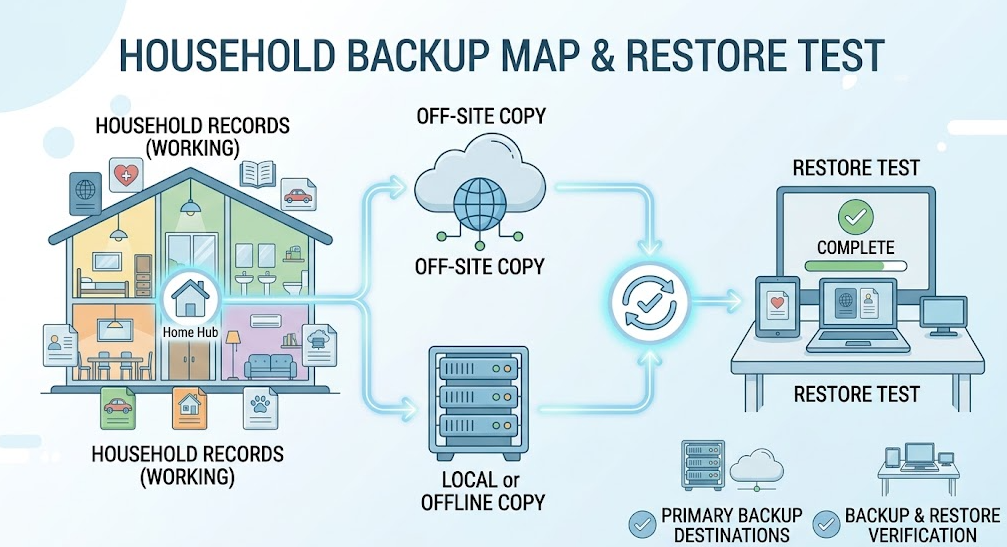
Quick decision: Start with a small set of critical identity, legal, property, insurance, tax, health, and financial records. Keep a working copy, a second copy on a meaningfully different storage system, and one copy separated from the home or primary account. Protect sensitive copies with encryption and strong account security. Retain recovery instructions for another authorized adult, and test a sample restore at least annually and after changing devices, services, passwords, or household roles.
Start With a Recovery Priority List
Do not begin by copying every download and photograph. Identify records whose loss would cause meaningful delay, expense, identity problems, missed rights, or inability to recover after an emergency.
Priority categories often include:
- identity, citizenship, immigration, and civil-status documents;
- wills, powers of attorney, custody, court, and estate records;
- home purchase, title-related, mortgage, tenancy, vehicle, and ownership records;
- current insurance policies, inventories, claims, and contact information;
- tax returns and supporting evidence still within retention;
- bank, pension, investment, debt, and benefit records needed to identify institutions and rights;
- health summaries, medication lists, care instructions, and key medical records;
- employment, education, licence, and credential evidence that would be difficult to reconstruct;
- product receipts, warranties, serial numbers, and major home-improvement records; and
- family and pet photos used for identification or recovery.
Record where the authoritative original is kept and whether the backup is for reference, replacement assistance, claim support, or accepted official use. A copy can preserve information without acquiring the legal effect of an original.
Distinguish Backup From Sync and Portal Access
Three systems are often mistaken for backup:
Issuer portal
The institution controls availability, history, export, and account access. Download records needed beyond the visible period or after the relationship ends.
Synchronized folder
Sync keeps files consistent across devices. That is convenient, but deletion, corruption, or malicious encryption may also synchronize. Version history can help, but its scope and duration must be known.
Second copy on the same device
Two folders on one computer are lost together if the drive fails, the device is stolen, or malware reaches both.
A backup is a recoverable copy with enough independence that the event affecting the working record does not automatically affect the backup.
Adapt the 3-2-1 Principle to Household Records
The US Cybersecurity and Infrastructure Security Agency describes the 3-2-1 rule as three copies of important files, on two different types of storage, with one copy off-site. It also recommends testing backup procedures.
For a household, that could mean:
- Working copy: the protected digital records folder or authoritative paper original.
- Second medium: an encrypted external drive that is disconnected when not backing up, or another storage system not dependent on the same device.
- Separated copy: a secured cloud account, protected off-site drive, or appropriate copy held in another location.
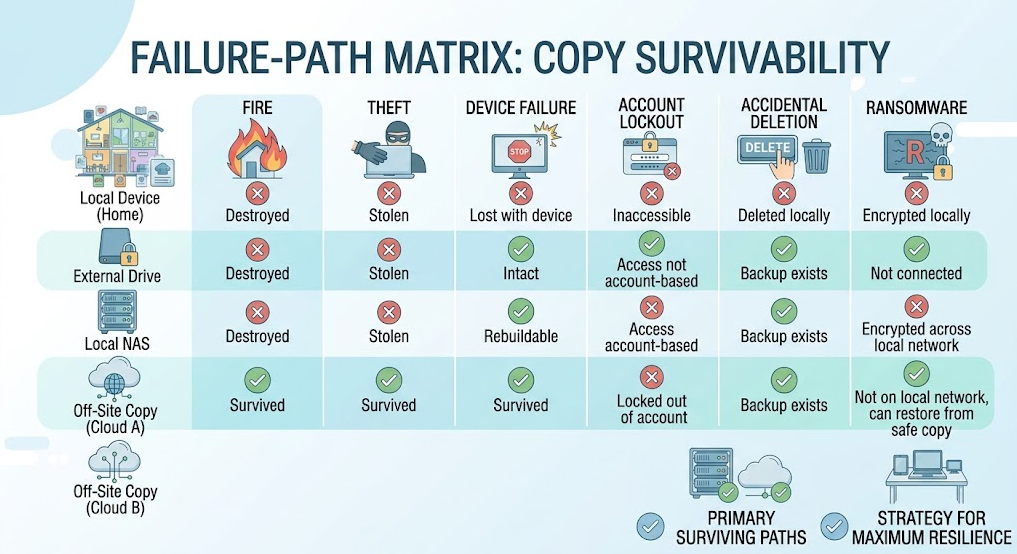
The goal is different failure paths, not merely three icons. Two cloud folders accessed through the same compromised email account may share the same recovery weakness. A computer and a permanently connected drive may both be reached by ransomware. A paper original and USB drive stored in the same emergency bag may be lost in the same theft.
Choose separation against the household’s actual risks: fire, flood, theft, device failure, account lockout, accidental deletion, malware, family separation, or incapacity.
Decide What the Backup Must Preserve
The backup should contain enough context to be usable:
- every page and relevant reverse side;
- names, dates, signatures, seals, reference numbers, and attachments;
- the final governing version rather than an unsigned draft;
- an understandable filename and folder path;
- the document’s category and retention trigger; and
- a note identifying where the original or authoritative electronic version exists.
For recurring records, decide whether to preserve every statement, annual summaries, or only records tied to taxes, claims, property, disputes, or another lasting purpose. Follow the retention logic in Article”How Long to Keep Bills and Receipts” rather than backing up clutter indefinitely.
Use common formats that can be opened without obsolete proprietary software. Verify scans at normal enlargement. Optical character recognition improves search but can misread names and numbers; preserve the page image.
Protect Sensitive Backups
Backups concentrate private information. A stolen drive or compromised cloud account can expose passports, tax returns, banking, health, property, and family records at once.
Use controls appropriate to the consequence:
- strong, unique account passwords;
- multifactor authentication;
- full-device or drive encryption;
- encrypted containers for especially sensitive files where manageable;
- limited sharing and periodic permission review;
- current operating systems and security updates;
- screen locks and physical protection for devices; and
- secure deletion before selling or discarding storage media.
The FTC recommends two-factor authentication because a password alone can be stolen. CISA’s ransomware guidance recommends offline, encrypted backups and regular availability and integrity testing.
Encryption creates its own recovery responsibility. If the encryption key, password, recovery code, or second factor is lost, the backup may be unreadable. Do not store the only recovery key inside the encrypted archive it unlocks. Give another authorized adult a controlled recovery route without distributing credentials broadly.
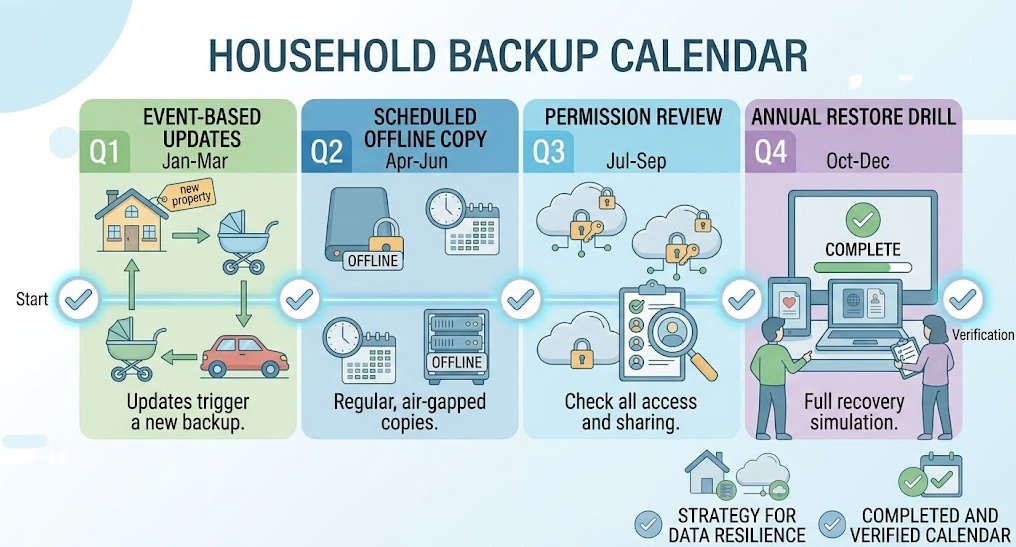
Choose an Update Schedule by Change Rate
Not every record needs the same backup frequency.
Update promptly after change
- new or renewed identification;
- signed legal or property documents;
- insurance renewals and claims;
- tax filing and assessment;
- major purchases or improvements;
- medication or care-plan changes; and
- new financial, pension, or benefit accounts.
Monthly or quarterly review
- statements deliberately retained;
- household inventory photographs;
- warranty and maintenance records;
- active disputes and reimbursement files; and
- current emergency contacts.
Annual full review
- retention dates;
- household access roles;
- storage service and device condition;
- encryption and recovery methods;
- off-site separation;
- obsolete formats or accounts; and
- restore testing.
Automatic backup reduces missed copying but does not remove the need to check scope. A successful status message may mean the software copied the folders it was told to copy—not that every critical record was included.
Make the Offline Copy Truly Independent
An external drive that remains connected all year may be convenient, but it can share exposure to malware, power damage, accidental deletion, or theft. For an offline layer:
- connect the drive only for the planned update or restore test;
- verify the source folders and completed copy;
- safely disconnect it;
- store it in a protected location separated from the working device; and
- record the backup date without placing sensitive details on an exterior label.
Portable drives can fail or become obsolete. Replace aging media before failure, keep compatible access hardware where practical, and migrate records when changing systems. Do not make a single old USB drive the permanent archive.
For off-site physical storage, consider transport, climate, theft, authorized access, and whether the same regional hazard could affect both locations. Do not hand an unencrypted identity archive to a friend merely to satisfy “off-site.”
Create a Recovery Map for Another Authorized Adult
A backup that only its creator understands may fail during illness, travel, incapacity, or death.
Create a recovery map that states:
- which record categories are backed up;
- the primary and backup locations;
- which person is authorized to access each layer;
- the device or service needed to read it;
- where recovery credentials or legal authority can be obtained;
- the last successful update and restore test; and
- who to contact for technical, legal, financial, or estate help.
Do not put full passwords, encryption keys, safe combinations, national identifiers, or complete account numbers on an exposed map. The map should lead an authorized person to the protected recovery method.
Review access after marriage, separation, death, a child reaching adulthood, executor changes, employee or caregiver changes, and changes to shared accounts.
Test Restoration, Not Just File Presence
A restore test answers the question the backup exists to solve: can the household recover a usable record after the working copy is unavailable?
At least annually, choose samples from identity, insurance, tax, property, health, and purchase records. Using a different authorized device or controlled test location where practical:
- locate the backup using the records map;
- authenticate without relying only on the usual phone or computer;
- restore the file to a safe temporary location;
- open every page;
- verify names, dates, signatures, and critical numbers;
- confirm the version is current and the original location is known; and
- securely remove temporary test copies.
NIST’s data-integrity guidance emphasizes recovery and validation that restored data is the last known good version. For a household, that means more than opening a filename: the content must be complete, trustworthy, and current enough for its purpose.
Record the test date, categories tested, failures found, and corrections made. Test again after changing cloud providers, computers, phones, authentication methods, encryption software, or authorized household roles.
Start With One Weekend Project
Build the first version without digitizing the entire house:
- list ten to twenty highest-consequence records;
- confirm original locations and scan quality;
- create consistent folders and filenames;
- make one protected second-medium copy;
- create one separated off-site or secure cloud copy;
- turn on multifactor authentication and encryption where appropriate;
- write the recovery map;
- have another authorized adult retrieve one sample; and
- schedule updates and an annual restore test.
Then expand by category. The measure of success is not how many gigabytes are stored. It is whether the household can recover the right evidence after losing the device, account, paper file, or home that normally provides it.
FAQ
Is cloud sync the same as a backup?
Not necessarily. Sync may reproduce deletion, corruption, or malicious encryption across devices. Check version history and recovery limits, and keep an independent copy with a different failure path.
What does the 3-2-1 backup rule mean?
Keep three copies of important records, use two different storage types, and keep one copy off-site. For households, the copies must also avoid sharing the same account, device, bag, or physical hazard.
Should I back up every household document?
Start with high-consequence identity, legal, property, insurance, tax, health, financial, and claim records. Expand selectively according to replacement difficulty, retention period, and recovery value.
Should an external backup drive stay connected?
Not if it is intended to provide an offline layer. A permanently connected drive may share malware, deletion, power, and theft risks. Connect it for updates and tests, then disconnect and protect it.
How should I protect cloud backups?
Use a strong unique password, multifactor authentication, restricted sharing, current recovery methods, and appropriate encryption. Confirm how another authorized adult can recover access without exposing credentials broadly.
How often should household records be backed up?
Update critical documents after major changes, review active categories monthly or quarterly as appropriate, and perform a full scope, access, and restore review at least annually.
How do I know whether a backup actually works?
Restore representative files, open every page, verify critical content and version, and test access without relying solely on the usual device. Record failures and correct them before the backup is needed.
Can a scanned copy replace an original document?
Not automatically. A backup preserves information and can help recovery, but the original or certified copy may still be required by an authority, contract, court, or transaction.
Sources
- Cybersecurity and Infrastructure Security Agency — Back Up Business Data
- Cybersecurity and Infrastructure Security Agency — StopRansomware Guide
- National Institute of Standards and Technology — Data Integrity: Recovering from Ransomware and Other Destructive Events
- Federal Trade Commission — Use Two-Factor Authentication
- Federal Trade Commission — Protect Your Personal Information From Hackers and Scammers