Closing a credit card can be the right decision. An annual fee may no longer earn its place. A card may encourage spending, duplicate another account, or belong to an issuer you no longer want to use. Reducing the number of accounts can also make household finances easier to monitor.
But closing should be a controlled exit, not a quick tap in an app. A card can still have pending purchases, subscriptions, refunds, rewards, interest, authorized users, or a security deposit attached to it. Closing it may also reduce your total available credit and change how your credit profile looks.
The useful question is not simply, “Can I close this card?” It is:
“Have I removed everything that still depends on this account, and is closing it better than keeping, changing, or temporarily locking it?”
The Quick Decision
Closing may make sense when the card has a cost you cannot justify, creates a spending or fraud-management burden, is no longer needed, or needs to be separated from a changed household or business arrangement.
Consider keeping it open, changing it to a more suitable product, or locking it temporarily when:
- it has no annual fee and is easy to monitor;
- it provides useful account history or available credit;
- you are about to apply for important credit and do not need to change your profile immediately;
- a refund, dispute, insurance claim, or other benefit is still unresolved; or
- you are reacting to one frustrating transaction rather than making a long-term account decision.
Keeping an account is not automatically better. An unused account still needs fraud alerts, current contact information, statement review, and secure access. The correct choice is the one you can manage reliably at a reasonable cost.
Start With the Consequences, Not the Phone Call
Closing a card is an account decision with several separate effects.
The debt survives the closure
Closing an account does not cancel its balance. You must continue paying according to the agreement, and interest or fees may continue while a balance remains. If possible, bringing the account to a verified zero balance makes the exit easier to audit. If you cannot pay in full, contact the issuer before closing and ask how payments, statements, interest, promotional terms, and account access will work afterward.
Do not stop a required payment because the card no longer works for purchases.
Merchant agreements survive the closure
Canceling a card does not necessarily cancel a gym membership, streaming subscription, insurance policy, software plan, charity donation, or other agreement with a merchant. The merchant may continue trying to collect. An account-updater service may even provide participating merchants with replacement credentials in some situations.
Cancel the service with the merchant if you no longer want it. If you still want it, move the payment method and confirm that the next charge succeeds.
Available credit may fall
Credit-scoring systems vary, and no one can promise how a closure will change a particular score. One common mechanism is straightforward: when a card closes, its credit limit may no longer count toward total available revolving credit. The same balances across less available credit can produce a higher utilization ratio.
For example, imagine two cards with combined limits of $10,000 and combined reported balances of $1,000. That simplified utilization is 10%. If a zero-balance card with a $5,000 limit closes, the same $1,000 balance across the remaining $5,000 becomes 20%.
That example is arithmetic, not a score forecast. Models consider more than utilization, reporting dates differ, and country, bureau, lender, and file details matter.
Account history does not follow one universal rule
An older card may contribute to the history visible in your credit file. Closing it does not necessarily make all of its history disappear immediately. How long closed accounts remain, how they are coded, and how a scoring model uses them vary.
This is why “always close the newest card” and “never close your oldest card” are both too rigid. Check the cost, age, limit, condition, and purpose of the specific account, then review your own reports after the change.
The U.S. Consumer Financial Protection Bureau says the effect depends on the situation and warns against assuming closure will improve a score. Canadian guidance likewise emphasizes payment history, available credit, utilization, account age, and the mix of credit rather than promising a result from one action.
Before Closing: Complete an Account Sweep
The safest closure begins with an inventory. Use statements, not memory alone.
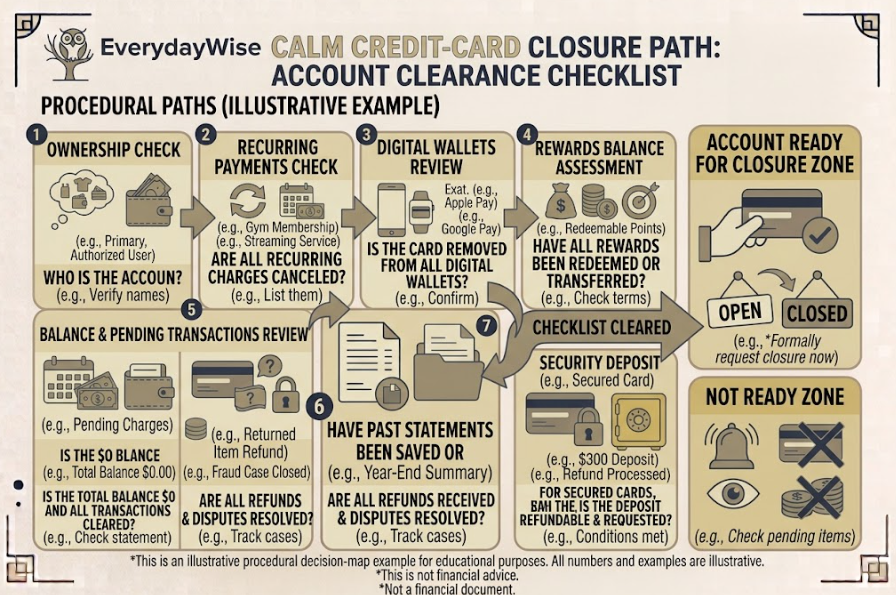
1. Confirm who owns the account
Determine whether you are the primary cardholder, a joint borrower, or an authorized user. An authorized user may be able to remove their card access but may not have authority to close the underlying account. Joint-account rules and liability depend on the agreement and jurisdiction.
Tell affected household members before changing access. If a separation, coercive-control concern, death, incapacity, or estate issue is involved, use the issuer’s specialized process and obtain appropriate legal or financial help rather than relying only on an ordinary closure checklist.
2. Stop placing new charges
Choose a cutoff date and stop using the card. Remove it from your physical wallet, but do not destroy it yet. A temporary issuer lock may help prevent new purchases while you complete the sweep, although a lock is not the same as account closure and may not block every recurring or previously authorized transaction.
3. Review at least a full cycle of activity
Read several recent statements and search for:
- subscriptions and memberships;
- utilities, phone, internet, insurance, rent, or tax payments;
- app-store and digital-wallet charges;
- annual or quarterly renewals;
- installment plans and promotional balances;
- merchant credits, deposits, and expected refunds;
- authorized-user purchases;
- disputed or fraudulent transactions; and
- cash advances, balance transfers, or card cheques.
An annual charge will not appear on every monthly statement. Search twelve months when practical, especially for insurance, software, clubs, professional dues, and domain renewals.
4. Move the payments you want to keep
Update each merchant directly. Record the date, new payment method, and confirmation number. Then watch the receiving account to verify that the change worked.
Keep enough money available for overlap. A merchant may submit one last charge to the old card while the new instruction is processing. Moving a payment method also does not change a service’s cancellation or contract terms.
5. Decide what to do with rewards and credits
Review the rewards agreement before closing. Points, miles, cash back, companion benefits, travel credits, certificates, or merchant offers may expire, be forfeited, become harder to redeem, or remain available under program-specific rules.
Redeem or transfer value only when the terms and economics make sense. Do not create unnecessary spending just to use a small reward. If a refund is expected after closure, ask whether it will be mailed, transferred, or left as a credit balance and how you must claim it.
For a full rewards comparison, see Article”Cash Back vs. Travel Rewards Cards”. This article owns only the exit check.
6. Resolve balances, pending activity, and disputes
Paying the balance shown in an app today may not finish the account. Pending purchases can post later. A merchant can issue a delayed adjustment. Interest calculated after the last statement may appear on a later statement. A disputed transaction or chargeback may still be under review.
Ask the issuer what must occur before the account is considered settled. Verify:
- posted balance;
- pending transactions;
- installment or promotional balances;
- interest accrued but not yet billed;
- fees not yet posted;
- disputes and fraud claims;
- expected refunds or credit balances; and
- authorized-user activity.
Closing with a balance may be allowed, but it does not stop repayment obligations or guarantee that existing promotional terms remain unchanged. Read the agreement and obtain account-specific instructions.
7. Download the records you may lose
Online access can change after closure. Before requesting it, save:
- recent statements;
- the cardholder agreement and current fee schedule;
- rewards balance and redemption records;
- dispute and fraud correspondence;
- purchase receipts needed for insurance or warranty claims;
- annual spending summaries needed for taxes or reimbursements; and
- secure messages about the closure or product change.
Store records securely for the period required by your tax, legal, warranty, or household needs.
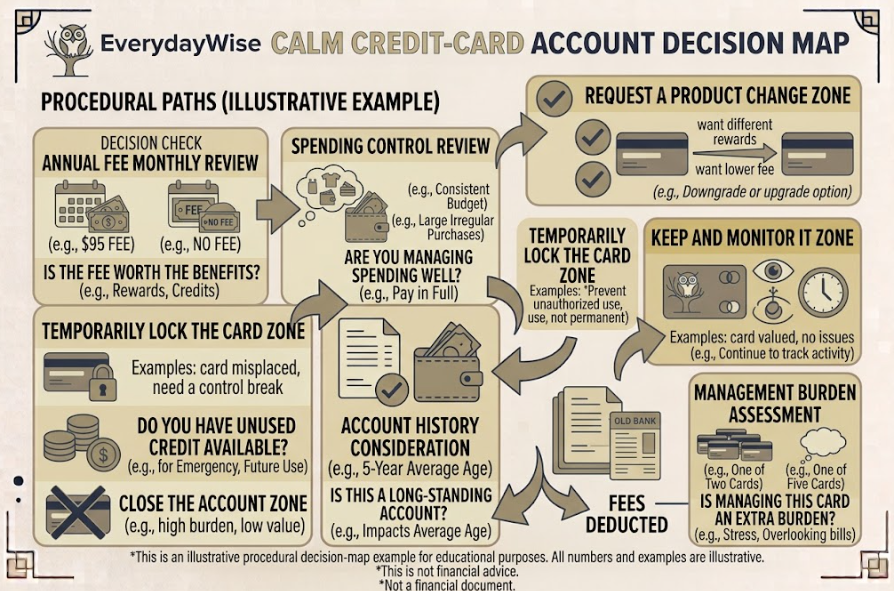
Compare Closure With the Alternatives
Before calling, ask the issuer what options exist. Availability is not guaranteed.
Product change
An issuer may allow a change to a lower-fee or no-fee card. This can preserve an account relationship without paying for benefits you no longer use. Ask whether the account opening date, number, limit, rewards, benefits, credit-report entry, and annual-fee treatment will change.
Do not assume a “downgrade” preserves everything. Get the terms before accepting it.
Temporary lock
A lock can help when a card is misplaced, when you want a spending pause, or while reviewing transactions. It does not necessarily stop fees, interest, recurring payments, account reporting, or all transaction types. It also does not formally close the account.
Keep the account with a narrow role
A no-fee card might remain useful as a backup or for one planned recurring bill. That only works if you can monitor it, protect it, and pay it reliably. For the household-account decision, see Article”Should You Carry More Than One Credit Card?“.
Close it despite a possible score change
Credit management should serve the household, not control it. If a card’s fee, temptation, complexity, or security burden is materially harmful, closure may still be reasonable even if available credit falls. A score is a tool used in lending decisions, not a reason to maintain an unsuitable financial product forever.
How to Make the Closure Request
Once the sweep is complete, use the issuer’s official contact channel. The Financial Consumer Agency of Canada states that cutting up a card, letting it expire, or not using it does not cancel the account. You must contact the issuer.
During the request:
- Verify the account and your authority to close it.
- State clearly that you want the credit-card account closed, not merely the card replaced or locked.
- Ask whether any balance, pending item, recurring transaction, refund, dispute, reward, fee, or deposit remains.
- Ask the effective date and whether any final action is required.
- Request written confirmation that the account is closed at your request.
- Record the date, channel, representative, and reference number.
If you send a letter or secure message, keep a copy. Do not include unnecessary sensitive information in ordinary email.
For a secured credit card, ask how the refundable deposit will be applied or returned, what may delay it, and what address or account will receive it. Detailed secured-card selection and deposit mechanics belong to Article”When a Secured Credit Card Makes Sense“.
After Closing: Verify the Exit
Do not treat the confirmation as the end of monitoring.
Read every final statement
Watch for trailing interest, late merchant submissions, refunds, fees, or a credit balance. If a new item appears, contact the issuer promptly. Continue required payments until the issuer confirms the balance is zero.
Confirm recurring services still work—or are truly canceled
Check the new payment account. A missed insurance premium, phone payment, or essential subscription can create a larger problem than the card fee you were trying to avoid.
Review the credit reports
After allowing normal reporting time, check that the account is shown accurately: closed, with the correct balance and payment status. Checking your own report does not itself lower your score. Dispute inaccurate information through the bureau and issuer processes applicable to your country.
Canada’s official guidance explains how to obtain reports from Equifax Canada and TransUnion Canada. In the United States, the official source for free reports is AnnualCreditReport.com, as identified by the CFPB.
Remove access and destroy the card
After you have written confirmation and no further reason to retain the physical card:
- remove it from digital wallets, browsers, and merchant accounts;
- delete stored card images and insecure notes;
- destroy the chip, magnetic stripe, number, and security code; and
- tell authorized users to destroy their copies.
Keep the closure confirmation and relevant final statements. Do not keep a full card number in an unsecured household file.

A One-Page Closure Checklist
Before the request
- Confirm primary, joint, or authorized-user status.
- Stop new purchases and notify affected users.
- Review recent statements and annual renewals.
- Move or cancel recurring charges directly with merchants.
- Remove the card from digital wallets after replacements are working.
- Redeem, transfer, or knowingly forfeit rewards under the program terms.
- Resolve pending charges, refunds, disputes, and insurance claims.
- Verify the full balance, including possible later interest or fees.
- Download statements, agreements, and important receipts.
- Compare closure with a product change, temporary lock, or managed retention.
During the request
- Use an official issuer channel.
- Ask to close the account, not merely disable the card.
- Confirm effective date, remaining obligations, and refund method.
- Request written confirmation.
- Save the reference number and representative details.
After the request
- Read final statements and keep paying any valid balance.
- Confirm moved payments succeed.
- Follow up on rewards, refunds, disputes, and secured deposits.
- Check credit reports for accurate closure and balance reporting.
- Remove stored credentials and destroy every physical card.
- Retain closure records securely.
The Bottom Line
Closing a credit card is not mainly about finding the cancel button. It is about separating a financial account from the rest of your life without leaving charges, benefits, records, or people behind.
First decide whether closure is better than a product change, temporary lock, or carefully monitored no-fee account. Then sweep the account for ownership, recurring payments, rewards, balances, pending transactions, refunds, disputes, records, and deposits. Make a clear request through an official channel and obtain written confirmation. Finally, monitor statements, payment changes, refunds, and credit reports until the exit is complete.
The cleanest closure is documented, verified, and boring. That is a good outcome.
Money disclaimer: This article provides general educational information, not individualized financial, credit, legal, tax, insolvency, estate, or product advice. Account-closing procedures, balances, interest, fees, rewards, deposits, consumer rights, credit reporting, and scoring effects vary by country, province or state, issuer, agreement, bureau, model, and personal circumstances. Verify current terms and official guidance before acting.
FAQ
Will closing a credit card hurt my credit score?
It may, but the direction and size cannot be predicted from one rule. Closing can reduce available credit and raise utilization, while account history and scoring treatment vary. Review the account’s cost, limit, age, and purpose rather than keeping or closing it solely for a promised score result.
Can I close a credit card while I still owe money?
An issuer may permit closure with a balance, but the debt, interest, fees, and required payments do not disappear. Ask how statements, account access, promotional terms, and payments will work after closure. Continue paying according to the agreement.
Does cutting up the card or locking it in the app close the account?
No. Cutting, not using, or letting a card expire does not formally close the account. An app lock is normally temporary and may not block every transaction type. Contact the issuer and request account closure, then obtain written confirmation.
What happens to subscriptions charged to the card?
Closing the card does not necessarily cancel the merchant contract. Move services you want to keep and cancel unwanted services directly with each merchant. Verify the next billing cycle because payment changes can fail or overlap.
What happens to rewards when I close the card?
Program rules differ. Rewards may be forfeited, expire, remain accessible, or be transferable. Check the agreement before closing and decide whether redemption is worthwhile without making unnecessary purchases.
Should I close an unused card with no annual fee?
Not automatically. Keeping it may preserve available credit or account history, but it still requires security, alerts, and review. Close it if the management burden or spending risk outweighs the benefit; otherwise give it a narrow, monitored role.
When is a secured-card deposit returned after closure?
The agreement controls the process. Outstanding balances, pending transactions, disputes, fees, or processing requirements may delay or reduce the return. Ask the issuer for the amount, method, destination, and expected process in writing, and follow up until the funds arrive.
References
- Financial Consumer Agency of Canada. “Cancelling your credit card.” Updated October 15, 2025. https://www.canada.ca/en/financial-consumer-agency/services/credit-cards/cancel-credit-card.html
- Financial Consumer Agency of Canada. “Using your credit card: know your rights and responsibilities.” Updated October 15, 2025. https://www.canada.ca/en/financial-consumer-agency/services/rights-responsibilities/rights-credit-cards/using-your-credit-card.html
- Financial Consumer Agency of Canada. “Improving your credit score.” Updated July 1, 2026. https://www.canada.ca/en/financial-consumer-agency/services/credit-reports-score/improve-credit-score.html
- Financial Consumer Agency of Canada. “Credit report and score basics.” Updated July 1, 2026. https://www.canada.ca/en/financial-consumer-agency/services/credit-reports-score/credit-report-score-basics.html
- Financial Consumer Agency of Canada. “Getting your credit report and credit score.” Updated July 1, 2026. https://www.canada.ca/en/financial-consumer-agency/services/credit-reports-score/order-credit-report.html
- Consumer Financial Protection Bureau. “Does it hurt my credit to close a credit card?” Last reviewed December 31, 2024. https://www.consumerfinance.gov/ask-cfpb/does-it-hurt-my-credit-to-close-a-credit-card-en-1231/
- Consumer Financial Protection Bureau. “Credit reports and scores.” Updated July 27, 2026. https://www.consumerfinance.gov/consumer-tools/credit-reports-and-scores/
- Consumer Financial Protection Bureau. “How do I get a free copy of my credit reports?” Updated September 8, 2025. https://www.consumerfinance.gov/ask-cfpb/how-do-i-get-a-free-copy-of-my-credit-reports-en-5/
- AnnualCreditReport.com. Official U.S. federally authorized credit-report portal. Accessed August 25, 2026. https://www.annualcreditreport.com/
More in This Cluster: Credit Card Decision Basics
- Credit Card vs. Debit Card: Which Should You Use?
- Cash Back vs. Travel Rewards: Which Card Fits You?
- How to Compare Credit Card Annual Fees
- APR Explained: What Cardholders Often Miss
- Should You Carry More Than One Credit Card?
- When a Secured Credit Card Makes Sense
- How to Close a Credit Card Without Unintended Consequences (you are here)